
Sending from a Template
When you create a signature request from a template, you pick the actual recipients for each role. Subnoto creates a new envelope from the template and sends it.
How to start
You can open the “create signature request” flow in two ways:
- From the Templates list - Open the actions menu (three dots) on a template row and choose “Create signature request”.
- From the template edit page - While editing a template, use the same action from the template’s actions.
You are taken to the Create signature request from template page.
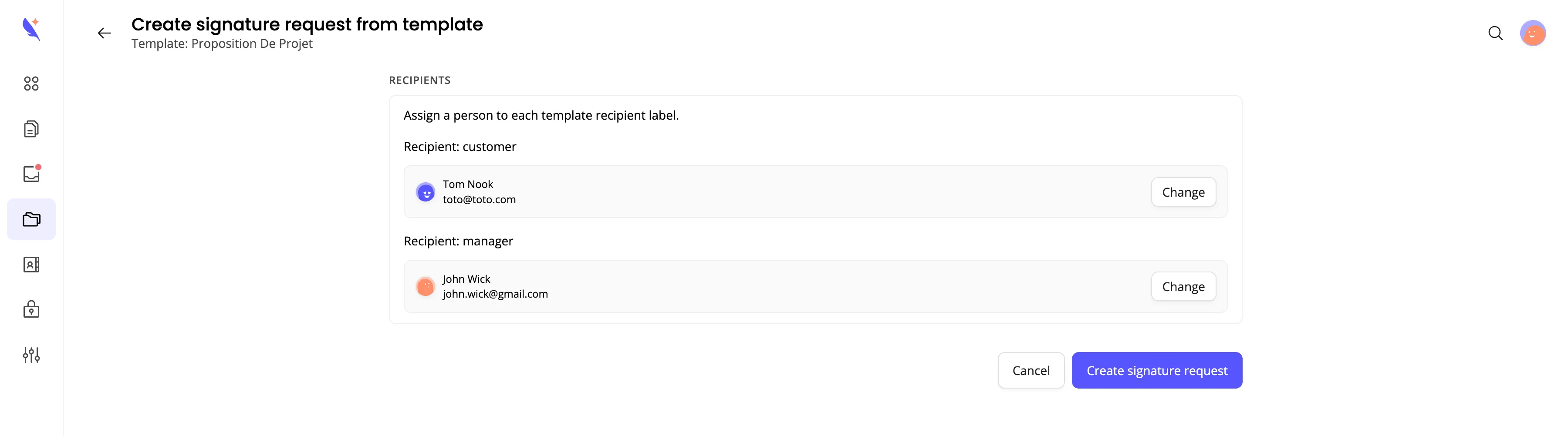
Choosing recipients
The template defines recipient labels (e.g. “Customer”, “Witness”). On this page you assign a real person to each label.
-
For each recipient label
- You’ll see one block per template recipient (e.g. “Recipient: Customer”).
- Click “Select or enter recipient” (or “Change” if one is already set).
-
Pick or enter the person
- From contacts - Start typing; matching contacts appear. Select one to use their email and name.
- From team members - Choose a member of your team if they are a signer.
- Manual - Enter email, first name, and last name yourself.
-
Repeat for every recipient
- All template recipients must be assigned before you can create the request. The button stays disabled until each role has someone.
-
Create the signature request
- Click “Create signature request”. Subnoto creates an envelope from the template, fills in the recipients you chose, and sends it. You can then preview and send or track it under Tracking Completion like any other envelope.
What happens next
- A new envelope is created from the template (document + fields + your chosen recipients).
- You remain the sender. You can open the envelope to preview, then send, or it may be sent automatically depending on your workflow.
- Recipients receive the usual signing emails and sign the document. Track progress from your envelope list or the tracking page.
If you need to send the same template to many recipients with the same fixed signers (Pro or Ultimate), see Bulk Send from a Template.
If you prefer to let others request a signature via a self-service intake page (e.g. from a link on your site), use Self-service signature forms instead.