
How to place signature fields with Smart Anchors
Smart Anchors are invisible placeholders you embed in PDF documents. When uploaded, Subnoto automatically detects them and creates signature or date blocks at those locations, eliminating the need to manually position fields via the API.
Format
Smart Anchors follow this format:
{{ [email protected] | blockType | width | height }}Components:
- Email: Must match an existing contact or team member (otherwise ignored)
- Block type: see Block types below -
signature(signature block),signature_date(date field) - Width/Height: Dimensions in PDF points (signature: 180x60 recommended; date: 120x30 recommended)
Block types:
- signature - Creates a signature block where the signer signs.
- signature_date - Creates a date field that displays the signer’s signing date.
Examples:
{{ [email protected] | signature | 180 | 60 }}{{ [email protected] | signature_date | 120 | 30 }}Critical Requirements
Make anchors invisible: Set the text color to match the page background exactly (e.g., white text on white background). If visible, the anchor will appear in the final document.
Email validation: The email must match an existing contact or team member in your workspace, otherwise the anchor is ignored.
Adding Smart Anchors to Your PDF
-
Open any editor (PDF editor like Adobe Acrobat, or Word editor like Google Docs, Microsoft Word, LibreOffice, etc.) - as long as it can export to PDF
-
Add text where you want the signature block to appear
-
Type the anchor format:
{{ [email protected] | signature | 180 | 60 }}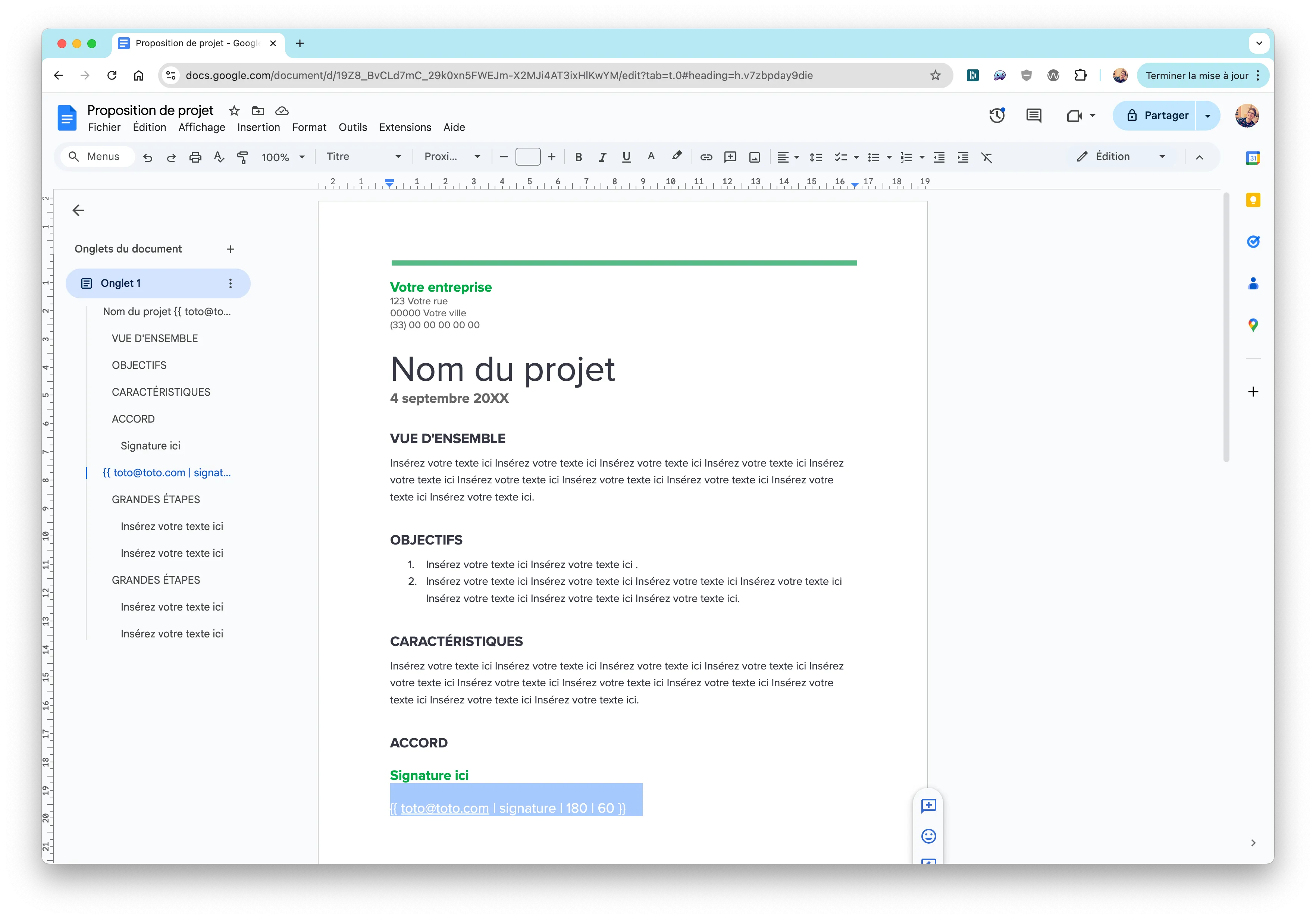
-
Set text color to match background (white on white, etc.) to make it invisible
-
Export or save as PDF
Testing Your Anchors
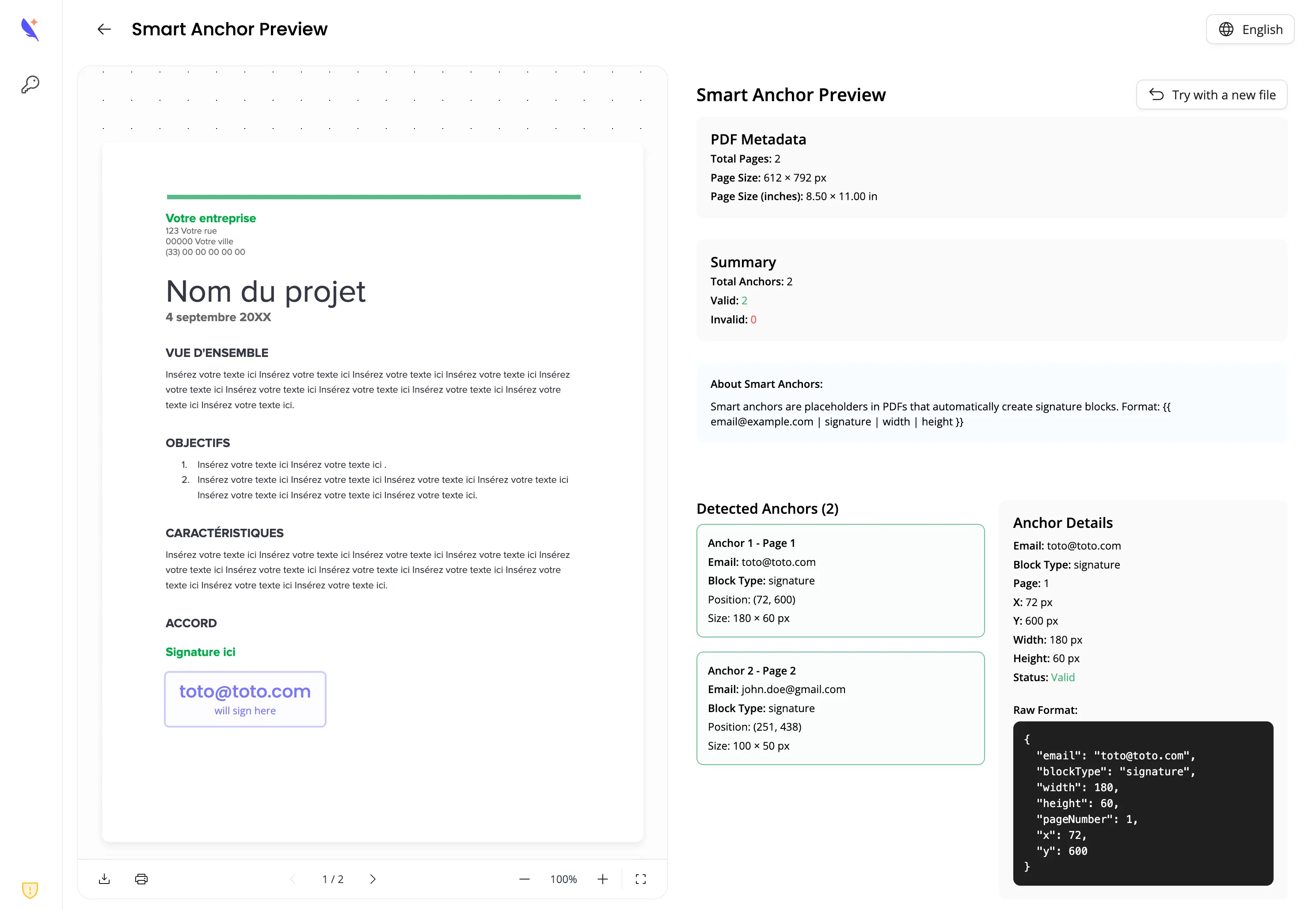
Use the Smart Anchor Preview Tool to validate anchor placement before uploading:
Using with the API
Enable Smart Anchor detection when uploading via the create-from-file endpoint:
curl -X POST https://enclave.subnoto.com/public/envelope/create-from-file \ -H "Authorization: Bearer $ACCESS_KEY:$SECRET_KEY" \ -F "workspaceUuid=your-workspace-uuid" \ -F "envelopeTitle=Contract" \ -F "detectSmartAnchors=true"const formData = new FormData();formData.append("workspaceUuid", "your-workspace-uuid");formData.append("envelopeTitle", "Contract");formData.append("file", createReadStream("document.pdf"));formData.append("detectSmartAnchors", "true");
await fetch(`${API_BASE_URL}/public/envelope/create-from-file`, { method: "POST", headers: { Authorization: `Bearer ${ACCESS_KEY}:${SECRET_KEY}`, ...formData.getHeaders() }, body: formData});When detectSmartAnchors=true, the response may include an optional smartAnchor object describing what was detected and applied:
blocks- Signature and date blocks that were created from anchors (uuid, type, page, position, recipient email/label).recipients- Recipients that were added from anchors (email, firstname, lastname, order).skipped- Anchors that were not fully applied, with a reason:UNRECOGNIZED_RECIPIENT- A block was created but the email was not in your contacts or team (no recipient was added).UNSUPPORTED_BLOCK_TYPE- The anchor used a block type other thansignatureorsignature_date; no block was created.ERROR- An error occurred while processing the anchor.
Use this to verify detection results, show users which anchors were placed, and surface skipped anchors (e.g. unknown emails) so they can add contacts or fix placeholders.
Recipients added from Smart Anchors have verificationType: "none" by default. If you want to embed the signing UI for them (iframe token), call POST /public/envelope/update-recipient to set updates.verificationType to "email" or "sms" first. See Iframe token.
Quick Reference
- A4 page size: 596x842 points
- Signature block: 180x60 points (3:1 ratio)
- Date block: 120x30 points
- Margins: Keep blocks 50-100 points from page edges
- Multiple anchors: Can be placed on the same page or different pages
Related Resources
- Create and Send Envelopes Tutorial - Complete envelope workflow
- Smart Anchor Preview Tool - Test and validate Smart Anchors
- API Reference - Complete API documentation