
Integrate with n8n
Ce contenu n’est pas encore disponible dans votre langue.
n8n is a workflow automation platform. The Subnoto community node lets you integrate Subnoto electronic signing into your n8n workflows: upload documents, add recipients, place signature blocks, and send envelopes without writing code.
The node is open source: n8n-nodes-subnoto on GitHub.
Prerequisites
- Self-hosted n8n: The Subnoto node is a community node and is only available on self-hosted n8n, not on n8n Cloud.
- Subnoto credentials: API base URL, access key, and secret key from your Subnoto account.
Installation
From the n8n UI (recommended)
- In n8n, go to Settings → Community Nodes → Install.
- Enter the package name:
@subnoto/n8n-nodes-subnoto. - Optionally specify a version (e.g.
@subnoto/[email protected]), then install. - Restart n8n when prompted. The Subnoto node will appear in your node list.
Manual install (CLI / Docker)
If your instance runs in queue mode or you prefer installing via the command line:
-
Install the package in n8n’s custom nodes directory:
Terminal window mkdir -p ~/.n8n/nodescd ~/.n8n/nodesnpm install @subnoto/n8n-nodes-subnotoFor Docker: run the same commands inside the container (e.g.
docker exec -it n8n sh), or use an image that installs this package and setN8N_CUSTOM_EXTENSIONSto the path where it’s installed. -
Tell n8n to load custom nodes by setting
N8N_CUSTOM_EXTENSIONSbefore starting n8n:Terminal window export N8N_CUSTOM_EXTENSIONS="/path/to/.n8n/nodes"n8n startUse
~/.n8n/nodesor the path where you rannpm install. -
Restart n8n, then add a Subnoto API credential and use the Subnoto node in your workflows.
Credentials
Create a Subnoto API credential in n8n with:
| Field | Description |
|---|---|
| API Base URL | Your Subnoto API base URL (e.g. https://enclave.subnoto.com) |
| Access Key | Your API access key |
| Secret Key | Your API secret key |
| Unattested Mode | Optional (default: false) |
Operations
The Subnoto node supports these operations:
- Upload Document — Upload a PDF or Word document and create an envelope.
- Add Recipients — Add recipients to an envelope.
- Add Blocks — Add signature blocks to a document.
- Send — Send the envelope to recipients.
- List Workspaces — List all workspaces the API key owner is a member of.
Example workflow: sending a document for signature
A typical flow is: trigger → list workspaces → filter (e.g. select a workspace) → read file from disk → upload document → add recipients → add signature blocks → send envelope.
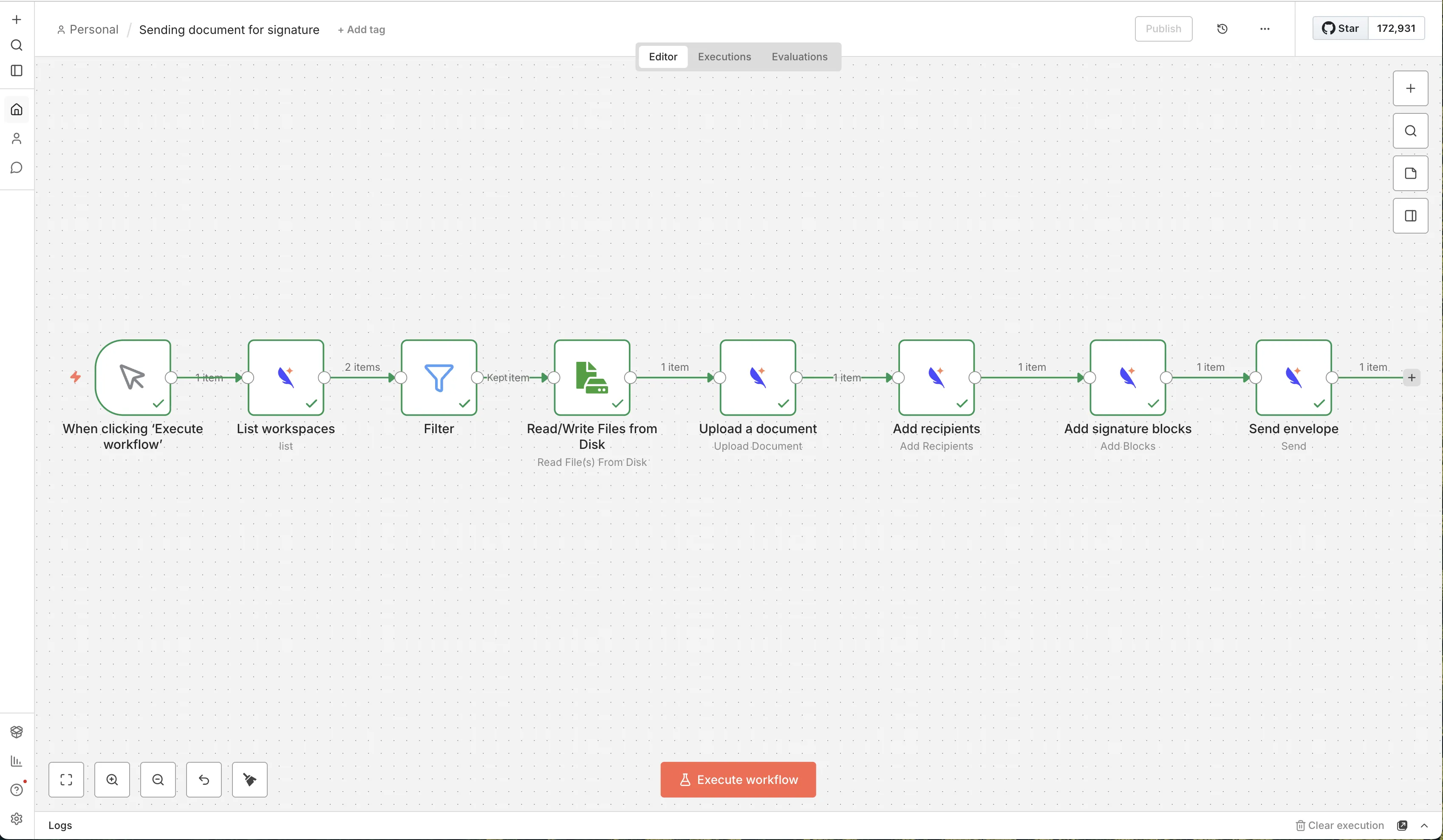
Steps in the example:
- When clicking “Execute workflow” — Manual trigger to run the workflow.
- List workspaces — Subnoto node: list workspaces to get workspace IDs.
- Filter — Keep the workspace (or item) you need for the rest of the flow.
- Read/Write Files from Disk — Read the PDF or Word file you want to send for signature.
- Upload a document — Subnoto node: upload the file and create an envelope.
- Add recipients — Subnoto node: add signers to the envelope.
- Add signature blocks — Subnoto node: place signature blocks on the document.
- Send envelope — Subnoto node: send the envelope to recipients.
After the workflow runs, recipients receive an email and can sign the document in Subnoto.
Development
To develop or test the node locally:
- Clone the repo: github.com/subnoto/n8n-nodes-subnoto.
- Install dependencies:
npm install - Build:
npm run build - For local n8n: link the package into n8n’s custom nodes directory and set
N8N_CUSTOM_EXTENSIONSto that path, then start n8n.
The repository includes a Dev Container; open it in VS Code or Cursor and use Reopen in Container to get a preconfigured environment with n8n and the Subnoto node loaded from the workspace.