
Integrate with CarboneIO
Ce contenu n’est pas encore disponible dans votre langue.
CarboneIO is a document generation API that converts templates (DOCX, XLSX, ODT, etc.) into PDF, DOCX, XLSX, and other formats by injecting JSON data. This tutorial shows how to generate documents with signature placeholders using CarboneIO and send them for electronic signatures via Subnoto.
For a complete working example, see the demo project on GitHub.
Prerequisites
- CarboneIO API key: Sign up at carbone.io (or your self hosted instance) to get your API key
- Subnoto credentials: Access key, secret key, and workspace UUID from your Subnoto account
- A programming language with HTTP client support (examples shown in Node.js)
Note: Examples are shown in Node.js, but both APIs are language-agnostic and can be used from any language that supports HTTP requests.
Sample Template
A sample employment contract template is available for download: sample-signature.docx. This template demonstrates how to structure signature fields in a CarboneIO document.
Overview
The integration flow:
- Generate a PDF using CarboneIO with signature placeholders (using
:signformat) - Extract signature positions from CarboneIO response metadata
- Upload the PDF to Subnoto and create an envelope
- Map CarboneIO signature positions to Subnoto signature blocks
- Send the envelope to recipients
CarboneIO Endpoints
1. Upload Template
First, upload your template to CarboneIO to get a template ID. You can upload via the API or use Carbone Studio:
const templateFile = await fs.readFile("./sample-signature.docx");const formData = new FormData();formData.append("template", templateFile);
const uploadResponse = await fetch("https://api.carbone.io/template", {  method: "POST",  headers: {    "Authorization": `Bearer ${CARBONE_API_KEY}`  },  body: formData});
const { templateId } = await uploadResponse.json();
For detailed API documentation on template management, see the CarboneIO Template Management API.
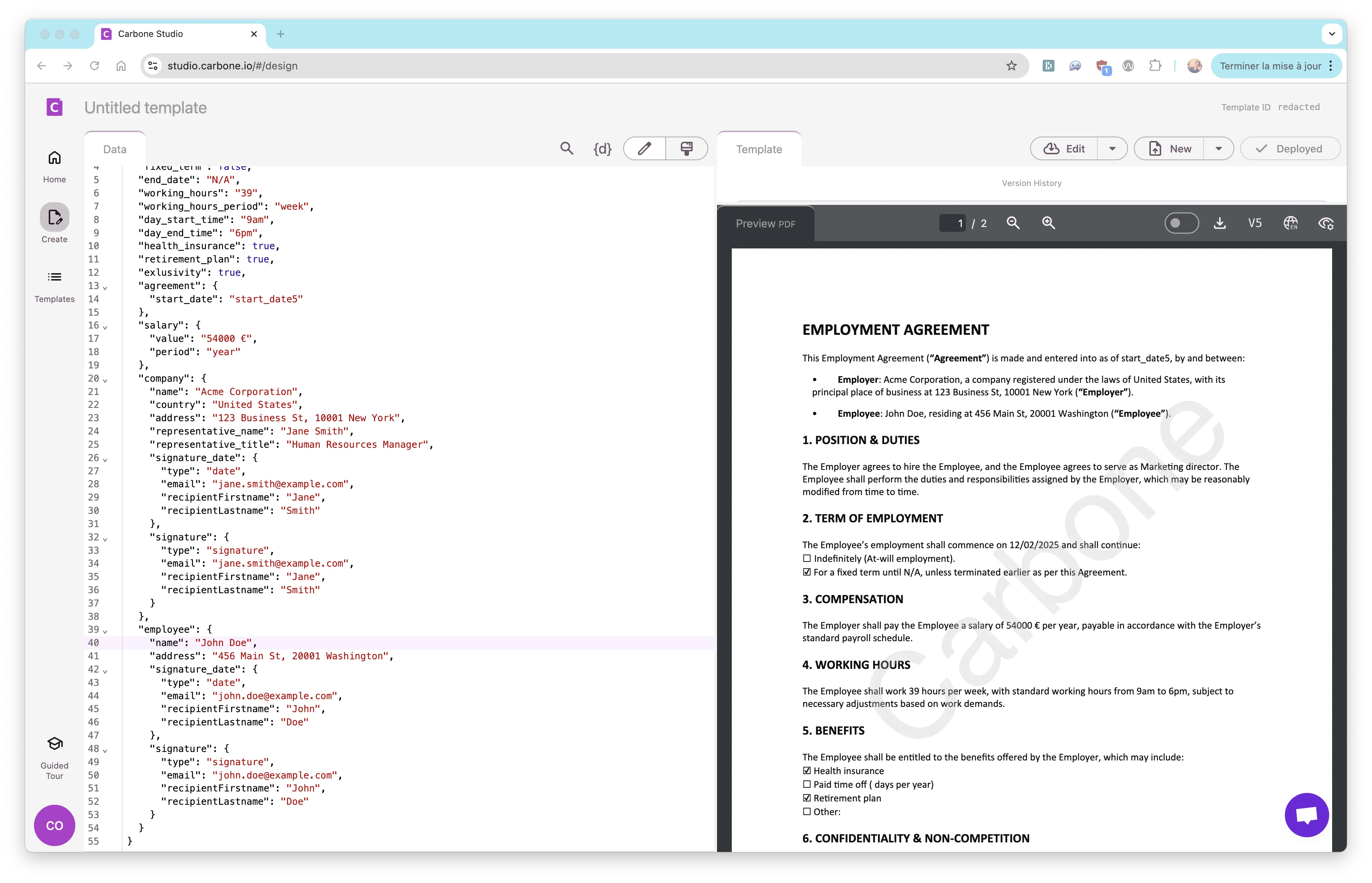
You can also upload and test your template using Carbone Studio:
2. Preparer Document with Signature Placeholders
Prepare the document with signature placeholders. To test, use the complete template data structure that matches the sample DOCX template:
Complete template data structure
const templateData = { job_title: "Marketing director", start_date: "12/02/2025", fixed_term: false, end_date: "N/A", working_hours: "39", working_hours_period: "week", day_start_time: "9am", day_end_time: "6pm", health_insurance: true, retirement_plan: true, exclusivity: true, agreement: { start_date: "start_date5", }, salary: { value: "54000 €", period: "year", }, company: { name: "Acme Corporation", country: "United States", address: "123 Business St, 10001 New York", representative_name: "Jane Smith", representative_title: "Human Resources Manager", signature_date: { type: "date", recipientFirstname: "Jane", recipientLastname: "Smith", }, signature: { type: "signature", recipientFirstname: "Jane", recipientLastname: "Smith", }, }, employee: { name: "John Doe", address: "456 Main St, 20001 Washington", signature_date: { type: "date", recipientFirstname: "John", recipientLastname: "Doe", }, signature: { type: "signature", recipientFirstname: "John", recipientLastname: "Doe", }, },};Signature fields must include type, email, recipientFirstname, and recipientLastname.
In your CarboneIO template, use the :sign format to mark signature positions. The template should reference the signature object:
{{ company.signature :sign }}{{ employee.signature :sign }}For detailed information about digital signatures in CarboneIO, including usage rules and examples, see the CarboneIO Digital Signatures documentation.
3. Generate Document and Extract Signature Positions
Generate the PDF using CarboneIO v5 API. The POST request always returns JSON with a renderId that you need to download:
const dataToRender = {  data: templateData,  convertTo: "pdf"};
const response = await fetch(`https://api.carbone.io/render/${templateId}`, {  method: "POST",  headers: {    "Authorization": `Bearer ${CARBONE_API_KEY}`,    "carbone-version": "5",    "Content-Type": "application/json"  },  body: JSON.stringify(dataToRender)});
// CarboneIO v5 always returns JSONconst jsonResponse = await response.json();
// Extract signature positions from JSON responseconst signatures = extractSignaturePositions({  headers: Object.fromEntries(response.headers.entries()),  body: jsonResponse});
// Get renderId and download the PDFconst renderId = jsonResponse.data.renderId;const downloadResponse = await fetch(`https://api.carbone.io/render/${renderId}`, {  headers: {    "carbone-version": "5"  }});
const pdfBuffer = await downloadResponse.arrayBuffer();
Extract signature positions from CarboneIO response. CarboneIO v5 returns signature metadata in the JSON body at data.signatures:
function extractSignaturePositions(response) {  const signatures = [];
  // CarboneIO v5 returns signatures in data.signatures array  if (response.body && typeof response.body === "object" && !Buffer.isBuffer(response.body)) {    const jsonBody = response.body;
    if (jsonBody.data && jsonBody.data.signatures && Array.isArray(jsonBody.data.signatures)) {      return jsonBody.data.signatures.map((sig) => ({        x: sig.x || sig.left || 0,        y: sig.y || sig.top || 0,        page: sig.page || 1,        type: sig.data?.type || "signature",        email: sig.data?.email,        recipientFirstname: sig.data?.recipientFirstname,        recipientLastname: sig.data?.recipientLastname      }));    }  }
  return signatures;}
Subnoto Endpoints
Install the Subnoto SDK:
npm install @subnoto/api-client# orpnpm add @subnoto/api-clientInitialize the Subnoto client:
import { SubnotoClient } from "@subnoto/api-client";
const client = new SubnotoClient({  apiBaseUrl: "https://enclave.subnoto.com",  accessKey: process.env.API_ACCESS_KEY,  secretKey: process.env.API_SECRET_KEY});
1. Upload Document and Create Envelope
Upload the generated PDF to Subnoto using the SDK’s uploadDocument helper method:
const result = await client.uploadDocument({  workspaceUuid: WORKSPACE_UUID,  fileBuffer: Buffer.from(pdfBuffer),  envelopeTitle: "Generated Contract"});
const { envelopeUuid, documentUuid } = result;
2. Add Recipients and Signature Blocks
Add recipients and signature blocks to the envelope using batch endpoints. Use the signatures array returned from the CarboneIO extraction:
// Collect unique recipients based on emailsconst recipientMap = new Map();signatures.forEach((sig) => {  if (sig.email && !recipientMap.has(sig.email)) {    recipientMap.set(sig.email, {      email: sig.email,      firstname: sig.recipientFirstname || sig.email.split("@")[0].split(".")[0] || "User",      lastname: sig.recipientLastname || sig.email.split("@")[0].split(".")[1] || ""    });  }});
// Add recipients to envelopeif (recipientMap.size > 0) {  const recipients = Array.from(recipientMap.values()).map((r) => ({    type: "manual",    email: r.email,    firstname: r.firstname || "User",    lastname: r.lastname || ""  }));
  const response = await client.POST("/public/envelope/add-recipients", {    body: {      workspaceUuid: WORKSPACE_UUID,      envelopeUuid,      recipients    }  });
  if (response.error) {    throw new Error(`Failed to add recipients: ${JSON.stringify(response.error)}`);  }}
// Add signature blocks (filter to only signature blocks, not date fields)const blocks = signatures  .filter((sig) => sig.type === "signature")  .map((sig) => ({    type: "signature",    page: String(sig.page),    x: sig.x,    y: sig.y,    recipientEmail: sig.email  }));
if (blocks.length > 0) {  const response = await client.POST("/public/envelope/add-blocks", {    body: {      workspaceUuid: WORKSPACE_UUID,      envelopeUuid,      documentUuid,      blocks    }  });
  if (response.error) {    throw new Error(`Failed to add blocks: ${JSON.stringify(response.error)}`);  }}
3. Send Envelope
Send the envelope to recipients:
const response = await client.POST("/public/envelope/send", {  body: {    workspaceUuid: WORKSPACE_UUID,    envelopeUuid  }});
if (response.error) {  throw new Error(`Subnoto send error: ${JSON.stringify(response.error)}`);}
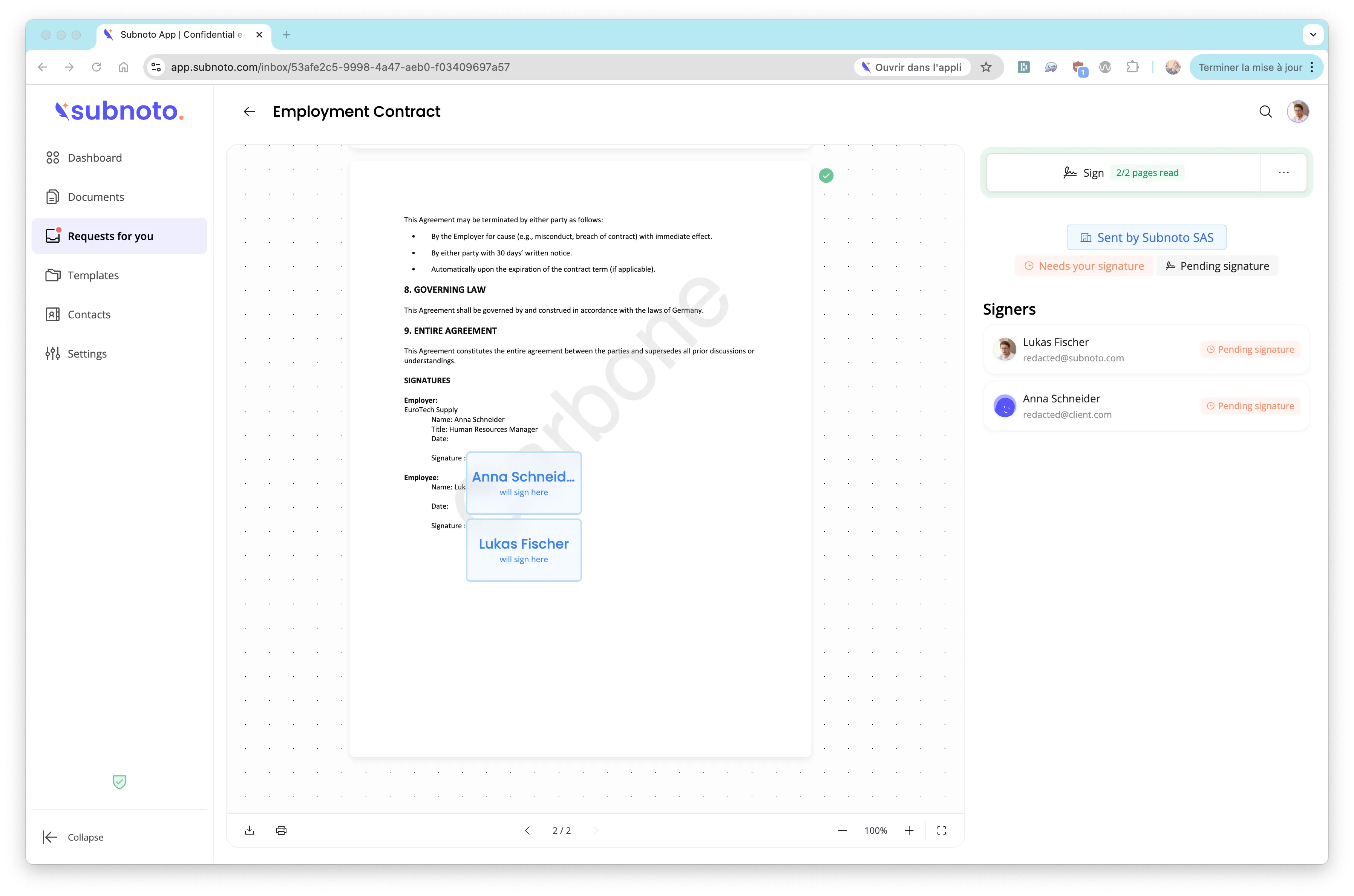
Once sent, recipients will receive an email notification and can sign the document. The final result shows the generated document with signature blocks positioned correctly:
Complete Example
See the complete working example for:
- Full implementation with error handling
- Environment configuration
- TypeScript types
- Complete integration flow