Today we’re launching the official Subnoto app on Zapier.
Zapier connects your tools together, so your signing workflow doesn’t stop at “completed”. With Subnoto on Zapier, you can connect Subnoto to 8,000+ apps (including 450+ AI tools) and automate what happens before, during, and after signatures — without maintaining custom integrations.
This post summarizes what the Zapier integration supports and how teams typically use it. A step-by-step example (Discord) is available in the docs.
Official Zapier listing:
What you can build with Subnoto + Zapier
Common use cases:
- Notify Slack/Discord when an envelope is created, sent, or completed
- Store signed PDFs and proof documents for compliance
- Create tickets/tasks when agreements are signed
- Update CRM records when contracts move to “completed”
What the official Zapier app supports
The Subnoto Zapier app includes built-in triggers and actions, so you don’t have to stitch together raw HTTP requests.
Triggers (examples)
- New Envelope: trigger when a new envelope is created
- Envelope Status Changed: trigger when an envelope reaches a specific status (sent, completed, declined, etc.)
- New Contact: trigger when a new contact is added
Actions (examples)
- Create & Send Envelope: upload a document and send it for signing
- Create & Send Envelope From Template: create an envelope from a template and send it
- Delete Envelope: delete an envelope and associated data
- Download Document: download the signed PDF document from an envelope
- Download Proof Document: download the proof (audit trail) PDF for a completed envelope
- Contacts: create or update contacts
Searches (examples)
- Get Envelope: get an envelope by UUID with full details and documents
- Find Envelope: search for envelopes in a workspace
- Find Contact: search for contacts in a workspace
- Find Template: search for templates in a workspace
These building blocks are designed to cover typical operational and post-signing workflows without requiring a custom backend.
Example (docs): send completed envelopes to Discord with the PDFs attached
If you want a concrete starting point, the docs include a worked Zap that:
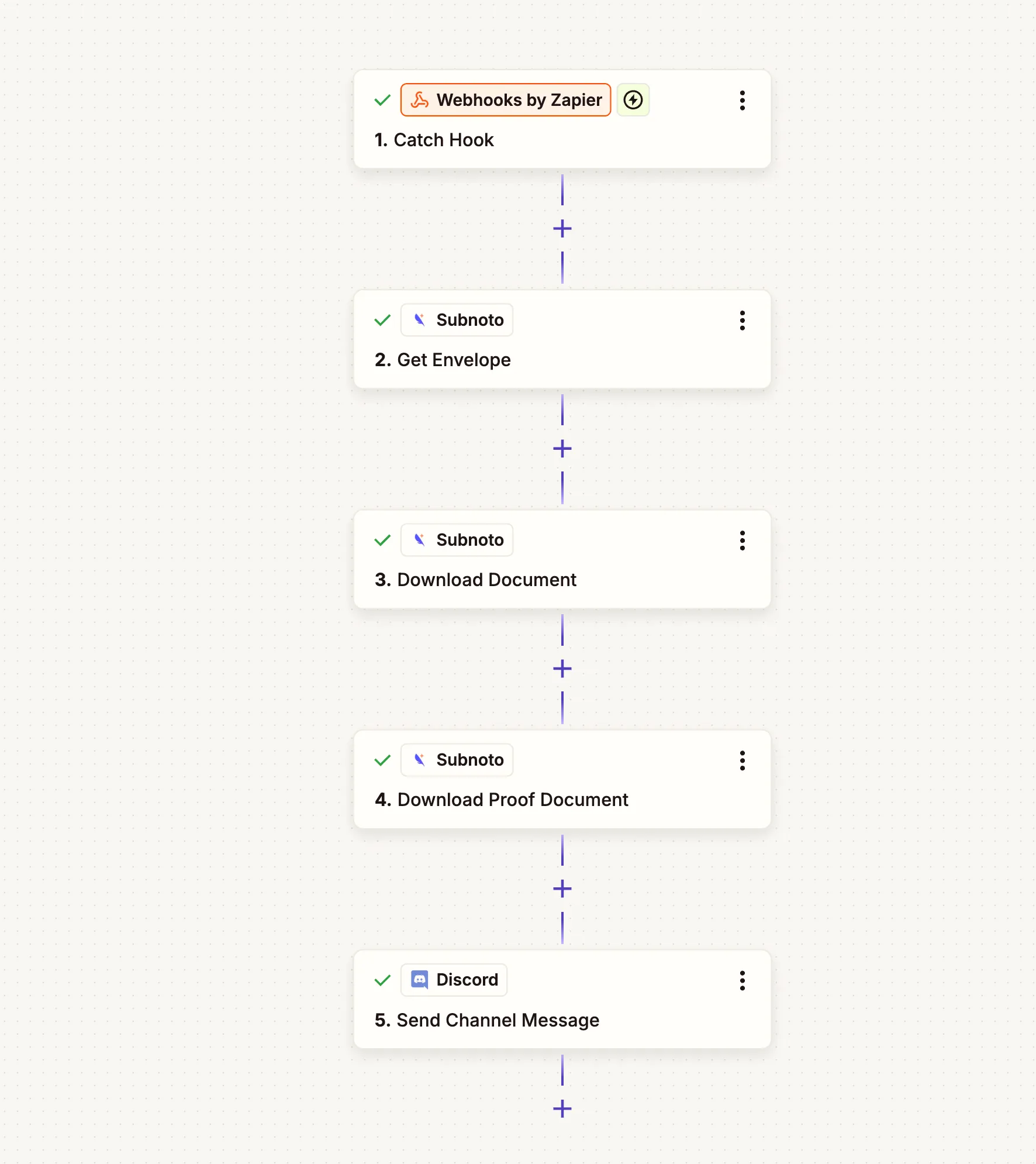
- triggers on
ENVELOPE_COMPLETED - downloads the signed document and the proof
- posts a Discord message with both files attached
It’s a practical template you can adapt to Slack, email, or storage apps.
Full tutorial (with field mappings + screenshots):
Security notes
- Create a dedicated Subnoto API key for Zapier. See: Create API keys.
- If you also process Subnoto webhooks server-side, configure a webhook secret and verify signatures. See: Verify webhook signatures.
Next steps
- Get started: Integrate with Zapier
- Learn completion downloads: Download signed document and audit proof after completion
- Set up webhooks: Setting up webhooks