
Build workflows that upload documents, place blocks, add recipients, and send envelopes—inside your own n8n instance.

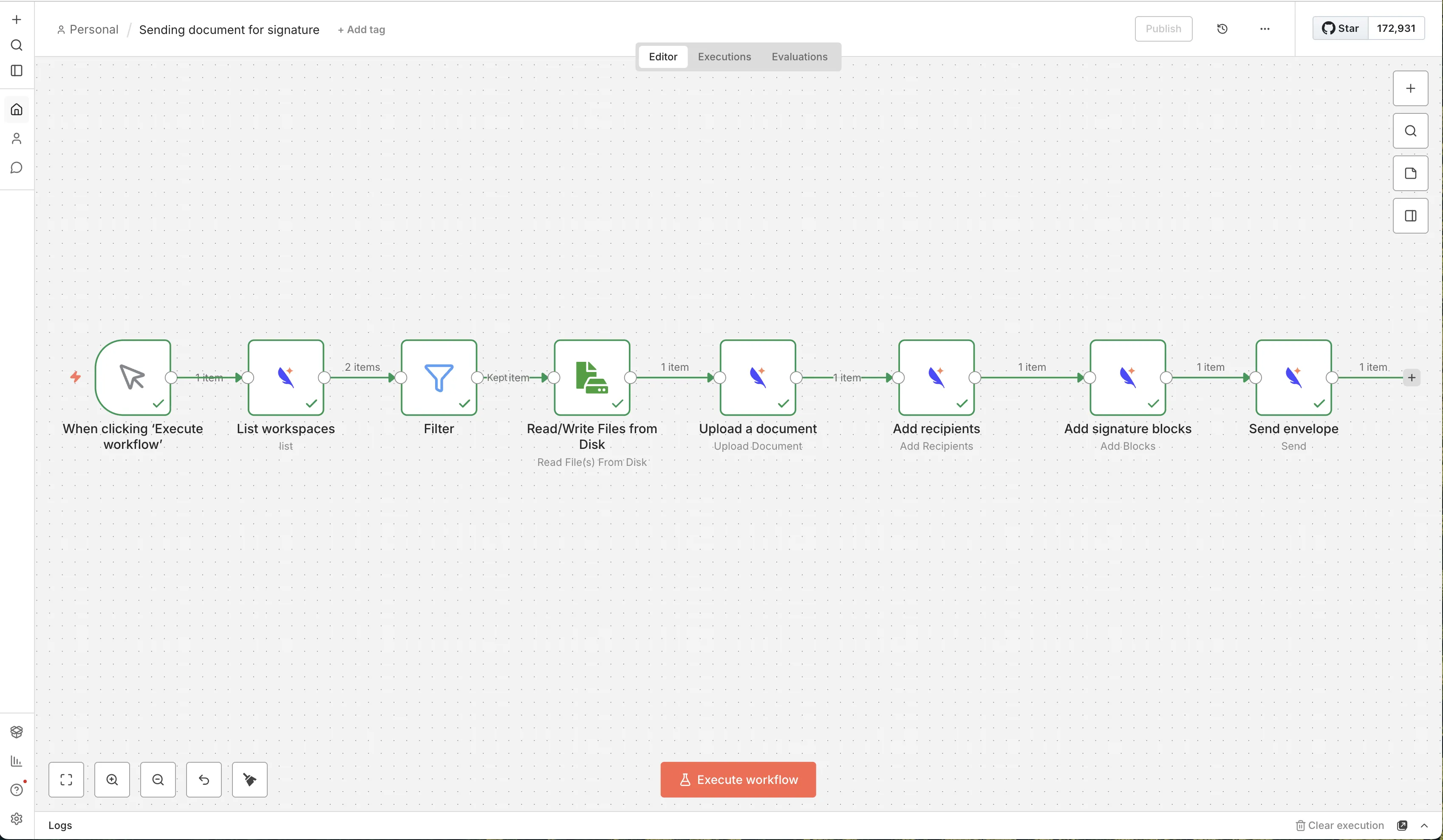
Trigger signing from internal events (CRM stage changes, form submissions, webhooks) with full control in your own infra.
Generate or fetch documents, create envelopes, add recipients + blocks, then send — all inside a single workflow.
Build deterministic multi-step flows: validations, approvals, retries, routing, and storage/notification fan-out.
Install the Subnoto community node in your self-hosted n8n.
Configure Subnoto API credentials (base URL, access key, secret key).
Use node operations: upload → add recipients → add blocks → send.
The Subnoto node is a community node, so it is intended for self-hosted n8n instances.
Typical operations include uploading documents, adding recipients, adding blocks, sending envelopes, and listing workspaces.
Yes. With self-hosted n8n, you control the workflow execution environment and how inputs/outputs are stored and routed.
Automate Subnoto signing workflows in self-hosted n8n with the community node. Upload documents, add recipients and signature blocks, and send envelopes.

Privacy-friendly e-signatures made in France 🇫🇷
© 2026 Subnoto. All rights reserved.